In scenarios where your hosting provider do not provide set of hosting name servers like ns1.dnsdomain.com and ns2.dnsdomain.com or you want to forward/redirect specific services like email, databases or web pages from your current server to another server or when you do not have functionality of adding up specific A, TXT, CNAME or other kinds of records on your domain side like PK Domain and you have cpanel access of your account then you can easily attain all goals mentioned above. You must always keep one thing in your mind that hosting name servers of your cpanel control panel must be pointed against your domain to have effect of changing various kinds of zone records.
You may follow below step by step guide to change your A, CNAME or various kinds of Records
- Login to your cPanel using provided credentials by your hosting provider
- Scroll Down and Go to Domains Section

- Click on Zone Editors

- Select the type of record you want to add from tabs A Records, CNAME Records, MX Records, DNSSEC. To view your old records or to edit/delete specific records, you can click on Tab “Manage”
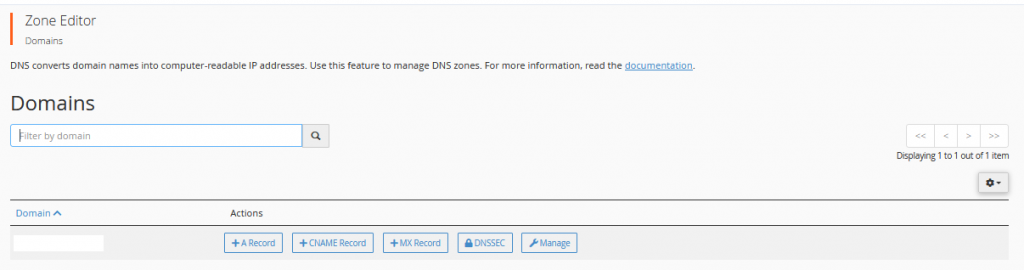
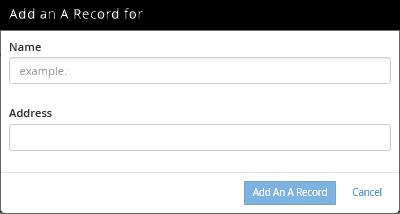
- Suppose, we are to add up an A record, we will click on “A Record” Tab and below box will appear, whatever the entries will be provided by provider or A records we want to add, we will insert here like to redirect a website we will put @ in the field of Name and IP in the field of address, this way whole traffic of our website will redirect to a new IP/Server. Here one thing is mentionable that to move traffic of www. or for a specific sub domain, we must have to create a separate record like for Name field we will type www or subdomain and in Address field there would be the IP of server where we want to redirect the traffic.
- If we want to add up a CNAME, we will click on “CNAME Records” Tab and insert relevant entries in the box.
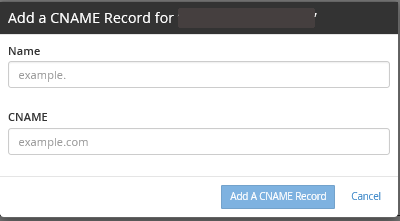
Keeping above examples in mind, we can add up or manage all other types of records. Usually one has to update CNAME and A records that is why we explained both in details. Above article is great for those who want to attach their domain with blogger/shopify or third party hosting providers paid and free without the functionality of managing dns settings.